Ever walked out of a meeting feeling like it was a total waste of time? If your team discussions feel flat or unproductive, the problem might not be the agenda. It could be the room itself. A space that works against you can kill a great idea, while the right meeting room layout can turn a slow update into a powerful brainstorming session.
This guide is all about getting your office environment on your side, so you can unlock your team’s true potential.
Table of Contents
- Why Your Meeting Room Layout Could Be Sabotaging Your Success
- Exploring the Most Effective Meeting Room Layouts
- Essential Design Elements Beyond The Layout
- Future-Proofing Your Spaces for Hybrid Work
- Making Sure Your Meeting Rooms Are Accessible and Inclusive
- A Simple Checklist for Choosing Your Perfect Layout
- Common Questions About Meeting Room Design
Why Your Meeting Room Layout Could Be Sabotaging Your Success
- Why a Good Layout Matters
- The Real Cost of Poorly Designed Meeting Rooms
- Choosing the Right Layout for Your Goals
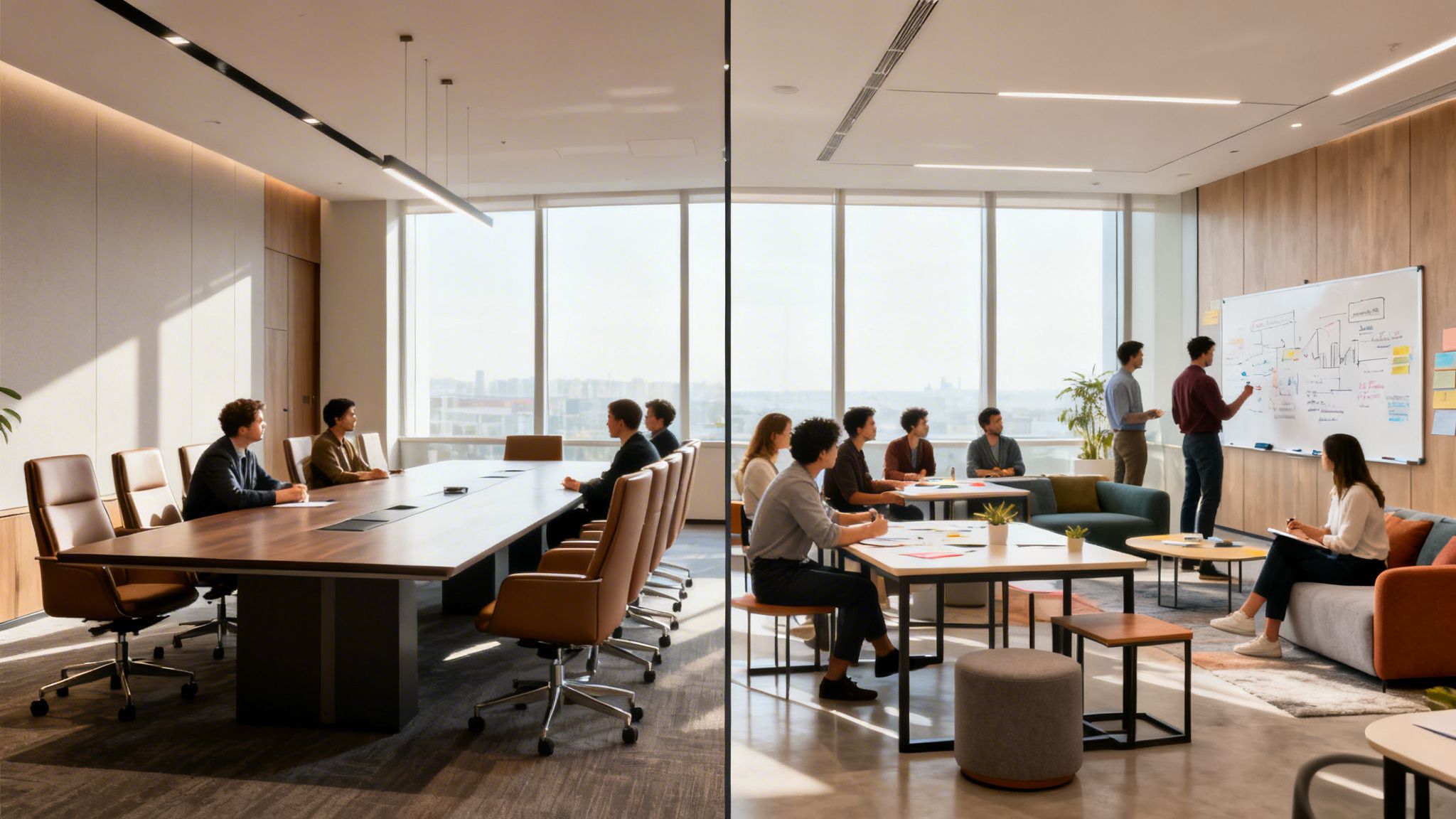
Think about it this way: asking your team to innovate in a stuffy, formal boardroom is like asking a rock band to write their next hit single in a library. The environment is actively fighting them. Getting the layout right is not just about moving chairs around. It’s about intentionally creating a setting that supports the exact kind of work you need to get done.
Why a Good Layout Matters
The way a room is set up has a direct, and often subconscious, influence on how people interact. A long, imposing boardroom table naturally creates a hierarchy, which can be perfect for top-down decisions. Swap that for a circle of comfortable chairs, and you suddenly have a space that invites open dialogue and equal participation, ideal for creative sessions.
Different arrangements lead to different outcomes:
- Boost Engagement: When everyone can see each other clearly, conversation flows more naturally. People are less likely to zone out or multitask on their laptops.
- Sharpen Focus: The right setup minimises distractions and keeps the group’s energy channelled towards the objective.
- Embrace Technology: A modern meeting room must seamlessly integrate everything from large video conferencing screens to digital whiteboards, not treat them as an afterthought.
A thoughtfully designed meeting space in your London office is not just a room. It is a powerful tool for driving innovation. It’s a clear signal to your team that their time, and their contributions, are valued.
The Real Cost of Poorly Designed Meeting Rooms
Bad meetings are not just frustrating. They have a very real financial cost. When a room’s design stifles communication or makes technology a hassle to use, you are burning through valuable employee time. That waste translates directly into lost productivity and money down the drain.
The global market for video conferencing infrastructure was valued at £3.8 billion in 2023, a figure reported by Astute Analytica. This highlights the huge investment businesses are making in communication tools, but that investment is wasted if the physical room does not support them.
An awkward layout means people waste the first five minutes fumbling with cables, shifting chairs, or craning their necks to see a screen. These small issues add up, killing focus and momentum before the meeting has even properly begun. In a dynamic business hub like Bishop’s Stortford, that lost efficiency is a cost no one can afford.
Choosing the Right Layout for Your Goals
There is no such thing as one “best” meeting room layout. The perfect setup is entirely dependent on what you want to achieve. A presentation for a large audience has completely different requirements from a small team’s daily stand-up.
This guide will walk you through how different arrangements shape interaction and decision making, helping you create spaces across Hertfordshire and Essex that truly work for your team, not against them.
Exploring the Most Effective Meeting Room Layouts for 2026
- Layouts for Focus and Formality
- Setups for Collaboration and Creativity
- Meeting Room Layouts at a Glance
The way you arrange a room does more than just fit people in. It dictates the entire flow and feel of a meeting. Every layout sends a clear signal, shaping how people interact, who holds the focus, and ultimately, how productive the session will be.
Getting this right is the first step towards creating a workspace your team will genuinely value. So, let’s break down the classic and modern layouts that businesses are using today, helping you choose the perfect setup for any occasion.
Layouts for Focus and Formality
Some meetings just demand a more structured, formal touch. These layouts are deliberately designed to direct attention, support clear decision making, and allow a speaker to command the room. They are less about open brainstorming and more about delivering information with impact.
Boardroom Style
Think of any high-stakes meeting in a film, you are probably picturing the Boardroom style. It is built around a single, impressive table where everyone is seated, creating an undeniable sense of occasion.
- Best For: Formal discussions, executive decisions, and crucial pitches to clients or board members.
- Group Dynamics: The long table creates a natural focal point, usually with a leader at the head. It encourages focused, serious conversation but can sometimes feel a bit formal for more junior team members.
- Capacity: Typically accommodates 8 to 20 people, depending on the size of the table.
U-Shape Style
Here, tables are arranged in a ‘U’, leaving one end open. This clever setup puts the presenter or facilitator front and centre, allowing them to move around and engage directly with everyone in the room.
- Best For: Training sessions, interactive workshops, and especially video conferences.
- Group Dynamics: It strikes a great balance. It is far more inclusive than a Boardroom setup because everyone can see the presenter and each other, which naturally sparks better discussion.
- Capacity: Works brilliantly for groups of 15 to 30 people, ensuring everyone has a clear line of sight.
A U-Shape layout is fantastic for hybrid meetings. It allows you to place a large screen and camera at the open end, making remote attendees feel like they are part of the conversation, not just observers.
Setups for Collaboration and Creativity
When your goal is to spark ideas, solve problems, and get the team working together, you need a layout that breaks down barriers. These configurations are more relaxed and flexible, fostering a sense of equality where conversation can flow freely. An office in a fast-paced environment like Braintree often thrives with these agile setups.
Classroom Style
Just like the name suggests, this involves rows of tables and chairs all facing a speaker at the front. While it feels quite formal, it is unparalleled for focused learning and information absorption.
- Best For: Educational seminars, product training days, and company-wide announcements where people need to take notes.
- Group Dynamics: All eyes are on the speaker. This layout is built for one-way communication, making it perfect for lectures but not for group discussion.
- Capacity: It is incredibly scalable, working for small training groups or audiences of 100 or more.
Cabaret Style
Picture a workshop or awards dinner. You have small, round tables dotted around the room, with chairs arranged in an arc so no one has their back to the main presentation area.
- Best For: Workshops, training events, and any function that mixes presentations with small group activities.
- Group Dynamics: This is a masterful blend of presentation and collaboration. Your audience can easily shift their focus from the speaker to teamwork with their tablemates without anyone having to move.
- Capacity: Very flexible. It is a great way to host larger groups of 30 to 100+ while keeping the atmosphere intimate and collaborative.
Huddle Spaces
These are not so much a formal layout as they are a vital part of the modern office. Huddle spaces are small, informal zones designed for those quick, spontaneous catch-ups between 2-4 people. They typically have comfy seating, a small table, and a whiteboard or screen for ad-hoc teamwork.
They are the go-to solution for quick problem-solving without needing to book a large boardroom. You can discover more about creating these focused spaces in our guide to office meeting pods for 2026.
Meeting Room Layouts at a Glance
This table provides a quick comparison of common meeting room layouts, their best use cases, and typical capacity ranges to help you choose the right fit.
| Layout Style | Best For | Capacity Guide |
|---|---|---|
| Boardroom | Formal Decisions & Pitches | 8 – 20 People |
| U-Shape | Presentations & Hybrid Calls | 15 – 30 People |
| Classroom | Training & Lectures | 20 – 100+ People |
| Cabaret | Workshops & Group Work | 30 – 100+ People |
| Huddle | Quick, Informal Teamwork | 2 – 4 People |
Essential Design Elements Beyond The Layout
Choosing the right meeting room layout is a brilliant start, but it is only half the story. The real magic happens when you get into the details, the little things that transform a four-walled room into a high-performance workspace where ideas can flourish.
These are the elements that make a space feel right, boosting energy and keeping everyone locked in. Getting them sorted in your office, whether you’re in Hertfordshire or Essex, is what unlocks genuine collaboration and productivity. Let’s look at the crucial ingredients that go into a truly effective meeting room.
Furniture That Fosters Focus
Ever sat through a meeting fidgeting in an awful chair? Uncomfortable furniture is not just a minor annoyance. It’s a productivity killer. If your team is shifting in their seats or straining to see over a bulky table, their attention simply is not where it needs to be.
That is why ergonomic chairs and adaptable tables are completely non-negotiable.
- Ergonomic Seating: Look for chairs offering proper back support and plenty of adjustability. A comfortable team member is a focused one, especially when you are settling in for a longer session.
- Adaptable Tables: Modular tables you can move and reconfigure on the fly are a game changer. They give you the freedom to switch from a formal boardroom setup to a collaborative workshop style in minutes.
Technology For Seamless Hybrid Meetings
In today’s workplace, your meeting room tech has to work flawlessly, every single time. There is nothing worse than clunky, unreliable technology causing delays and frustration, especially when you have remote team members trying to dial in. The goal is to make the experience feel completely seamless for everyone, no matter where they are.
As you can see, the most popular layouts all rely on great tech to really work.
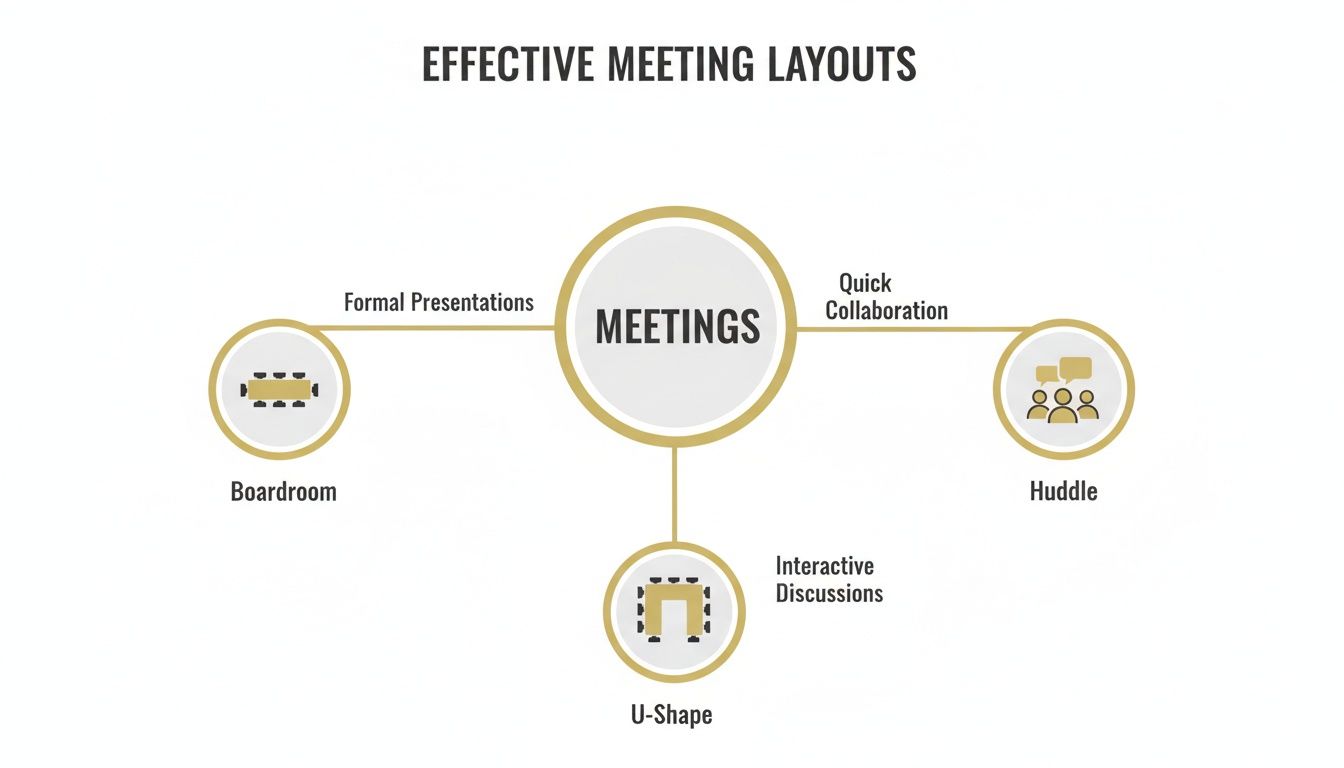
This just goes to show how different meeting goals, from big decisions to quick huddles, demand entirely different setups and technology. A U-Shape layout, for instance, is brilliant for hybrid meetings, but it falls flat without the right audio-visual (AV) equipment to back it up.
Essential AV tech for 2026 and beyond includes:
- High-Quality Cameras: Intelligent cameras that automatically frame the person speaking are fast becoming standard. They make remote participants feel like they are right there in the room.
- Intelligent Microphones: Forget passing a mic around. Ceiling-mounted or distributed microphone systems ensure every voice is heard with perfect clarity.
- Interactive Displays: Digital whiteboards and touch-screen displays are brilliant tools, allowing people in the room and those joining remotely to collaborate on the same canvas in real time.
Acoustics To Ensure Every Voice Is Heard
Have you ever been in a meeting where echo and background chatter make it impossible to concentrate? Poor acoustics are a surprisingly common problem, especially in modern offices full of glass and other hard surfaces. Getting a handle on distracting noise is critical for clear communication.
A room with poor acoustics makes everyone, especially remote attendees, feel exhausted. Adding simple acoustic panels or even a rug can dramatically improve sound quality and reduce meeting fatigue.
Solutions can be as simple as adding soft furnishings like rugs, curtains, or fabric-covered chairs. For more dedicated sound control in open plan areas, you can explore options like our guide to office partition systems to create acoustically-separated zones. And for offices needing total privacy, dedicated acoustic pods are often the best solution.
Lighting To Set The Right Mood
Finally, never underestimate the power of good lighting. Harsh, flickering fluorescent lights can cause eye strain and sap energy, while a dimly lit room can feel sleepy and uninspiring. Strategic lighting is about more than just visibility. It is about setting the right tone for the task at hand.
The best approach is a layered lighting system you can control. A combination of natural light, bright overhead lights for focus, and softer, adjustable lamps lets you tailor the atmosphere perfectly to the meeting’s purpose.
Future-Proofing Your Spaces for Hybrid Work in 2026
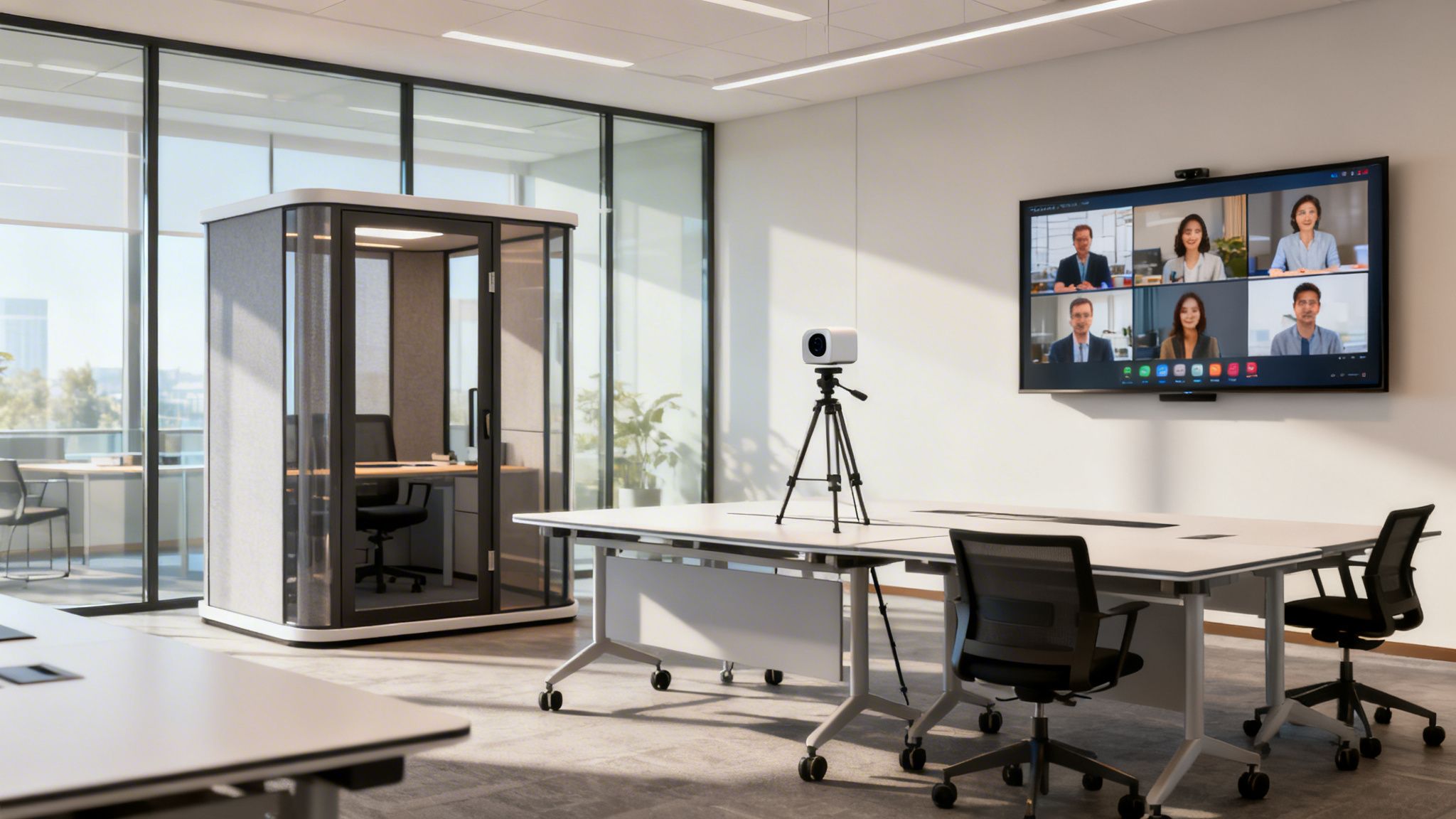
The modern workplace is not just four walls and a roof anymore. It’s a dynamic network of people collaborating from wherever they happen to be. Your meeting rooms have to bridge that physical and digital gap, bringing team members in the office and those working remotely together as one. It is all about creating an environment where the tech and the physical space just work.
This is not a passing trend. The move to hybrid working is fundamentally changing how UK offices are being designed. Data from Flexioffices shows a clear shift away from old-school, desk-heavy layouts. Between 2022 and 2025, the number of desks per 100 employees plummeted by 30%, dropping from 79 to just 56.
Meanwhile, flexible space occupancy is hitting 80% across the UK, and hiring a meeting room now costs an average of £27 per hour. You can discover more about these UK office space statistics and see how the market is responding.
Future-proofing your meeting spaces really means building in flexibility from day one. The aim is to create a space that can transform to fit the needs of any meeting, at any time.
Embracing Adaptability with Modular Furniture
Rigid, heavy furniture simply has no place in the agile office of 2026 and beyond. The secret to a truly versatile meeting space lies in modular furniture that can be moved and reconfigured in minutes.
Think lightweight tables on castors, ready to be joined for a large boardroom session or split apart for small group workshops. This approach gives you a dynamic workspace that can wear many hats throughout the day.
- Quick Changes: Effortlessly switch from a presentation-focused Classroom style to a collaborative U-Shape for a hybrid call, all without needing a dedicated facilities team.
- Space Efficiency: Instead of having multiple rooms for single functions, one adaptable room can do the job of three. That makes your office footprint far more efficient.
- Empowered Teams: Letting teams arrange the room to fit their own workflow gives them a sense of ownership and often leads to more engaging and productive sessions.
Creating Zones with Glass Partitions
Open-plan offices are great for building community, but they can be a nightmare for focused meetings with all the background noise and distractions. Glass partitions are an elegant fix, letting you carve out distinct zones without losing that open, light-filled atmosphere.
These partitions provide vital acoustic separation, keeping private conversations private. They define the edges of a meeting area while maintaining a visual link to the rest of the office, which stops the space from feeling cramped or cut off. For any business, but especially one in a bustling hub like Cambridge, this blend of privacy and openness is crucial for productivity.
Glass partitions are one of the most effective tools for modernising an office. They create quiet, functional meeting spaces without building walls that block natural light and make the office feel smaller.
The Rise of Office Pods for Focus and Privacy
Sometimes, you just need a quiet spot to think or take an important call without being interrupted. That is exactly what office pods are for. These are freestanding, soundproof booths that can be dropped right into an open-plan office, giving you an instant private space for focused work or confidential video calls.
Leading brands like Vetrospace, BlockO, and Framery have perfected the art of the office pod. They offer a whole range of sizes, from single-person phone booths to small meeting pods for four, all fully equipped with ventilation, lighting, and power.
Why Pods are a Smart Investment
| Feature | Benefit For Your Team |
|---|---|
| Acoustic Privacy | Complete soundproofing for confidential calls and deep focus, cutting down distractions for everyone. |
| Plug-and-Play | Pods are installed in hours with minimal fuss, providing an immediate solution without major construction work. |
| Flexibility | Because they are not permanent structures, pods can be moved to different spots as your office layout evolves. |
Making Sure Your Meeting Rooms Are Accessible and Inclusive for 2026
A truly great meeting room is not just about the right table or the flashiest tech. It’s a space where everyone feels they belong and can contribute their best work. Making your spaces accessible is far more than a box-ticking exercise for compliance. It is a powerful statement about your company culture, one that shows every team member is valued.
When you design with inclusivity at the core, you are not just making adjustments. You are actively removing barriers. This sends a clear message that you care about your people, allowing your best talent to focus on innovation and collaboration, not on navigating a challenging environment.
Planning for Physical Accessibility
First things first, let’s talk about movement. Every single meeting room layout, regardless of style, needs clear, unobstructed pathways. This is absolutely critical for wheelchair users, but it also makes the space safer and more comfortable for everyone.
- Doorways and Pathways: Make sure all doorways are wide enough for comfortable access. The ideal minimum is 850mm. Main routes for walking through the room should be at least 1200mm wide.
- Space Around Furniture: Think about the space needed to actually use the room. Leave enough clearance around tables for people to pull out chairs and move behind them easily, a good rule of thumb is at least 900mm behind a seated person.
- Clear, Level Flooring: Trip hazards are a definite no-go. Keep floors completely clear of loose cables or raised thresholds. Cable tidies and integrated floor boxes are your best friends here.
For businesses in growing hubs like Chelmsford, creating these kinds of accessible spaces is a major advantage in attracting and retaining a diverse workforce. It signals that you are a modern, people-first employer.
Accessibility is a cornerstone of good design. It’s about empathy and foresight, creating an environment where no one feels like an afterthought. A small adjustment in layout can make a world of difference to an individual’s daily experience.
Integrating Technology for All Users
Technology should be an enabler, never a barrier. As hybrid meetings become the standard, ensuring your AV controls and digital tools are straightforward for everyone to use has become more important than ever.
Accessible Tech Checklist for 2026
| Technology Element | Accessibility Consideration | Why It Matters |
|---|---|---|
| AV Controls | Place control panels at a reachable height and ensure they have simple, high-contrast interfaces. | Everyone should be able to start a meeting or share their screen without needing to ask for help. |
| Screen Placement | Position screens so they are clearly visible from every seat, without glare or obstructions. | This guarantees all participants, including those with visual impairments, can see the content clearly. |
| Audio Systems | Use high-quality microphones that capture voices from all around the room. Consider installing hearing loop systems. | This is a game-changer for attendees who are hard of hearing and drastically improves audio clarity for remote colleagues. |
A recent report from Zoom underscored that crystal-clear audio is non-negotiable for successful hybrid meetings. This becomes even more critical from an accessibility standpoint, as poor audio can completely shut out team members with hearing difficulties.
By thoughtfully planning both your physical layouts and your technology, you are not just meeting legal standards. You are building a more equitable, productive, and genuinely welcoming workplace for your entire team, whether they’re based in Hertfordshire or Essex.
A Simple Checklist for Choosing Your Perfect Layout for 2026
With so many layout options, it’s easy to feel a little lost. But do not worry, choosing the right meeting room design is not as complex as it seems. It really just comes down to asking a few straightforward questions to find the perfect fit for your business.
This checklist is designed to help you cut through the noise. It will walk you through the key considerations, ensuring the layout you choose is a smart investment that empowers your team for years to come.
What Is the Main Goal of the Room?
First things first, what will the space be used for 80% of the time? Pinpointing its primary purpose will instantly guide you towards the most effective layouts.
- Decision-Making: If the room is for leadership summits and formal decisions, nothing sets the right tone quite like a Boardroom style.
- Training and Presenting: For sessions where one person needs to command the attention of a group, a Classroom or U-Shape layout is an excellent choice.
- Collaboration: When it’s all about brainstorming and dynamic teamwork, a more relaxed Cabaret setup or an informal Huddle space works wonders.
Who Will Be Using It and How Many?
Next, think about the people. The number of attendees and their specific needs are absolutely crucial for creating a functional space.
A room built for ten will feel cavernous and impersonal for a two-person chat. On the other hand, trying to cram too many people into a small area is a surefire way to kill creativity. Plan for your average meeting size, but also consider how the space might adapt for larger or smaller groups when you need it to. For any growing business, a flexible design is always a wise move.
What Technology Is Essential?
These days, technology is not an afterthought, it is completely central to how modern meetings run. Before you do anything else, make a list of your must-have tech.
- Will you need a large screen for seamless video conferencing?
- Is an interactive whiteboard a non-negotiable for collaborative sessions?
- Do you require sophisticated microphones and cameras for truly effective hybrid meetings?
Your answers here will shape everything from furniture placement to the underlying electrical and data cabling. For a deeper dive, you might find our complete office space planning checklist helpful.
What Is Your Budget?
Finally, let’s talk numbers. A full-scale refurbishment with high-end AV systems will naturally require a larger budget than a simple furniture refresh. The key is to see this as an investment, not just a cost.
A thoughtfully designed meeting room can deliver a significant return by boosting productivity, fostering better collaboration, and improving employee satisfaction. Your budget sets the scope, of course, but even small, strategic changes can make a massive impact.
Working through these key questions removes the guesswork. It empowers you to confidently choose a meeting room layout that will genuinely work for your team and your business, day in and day out.
Common Questions About Meeting Room Design
Over the years, we have guided countless clients through the process of designing their new meeting rooms. Here are some of the most common questions that come up, along with our practical advice for creating spaces that genuinely work.
What’s the Best Layout for a Hybrid Meeting?
When it comes to hybrid meetings, the real goal is making sure your remote team members feel as included as everyone physically in the room. We find that a U-Shape or a slightly modified Boardroom layout often hits the mark, especially when you pair it with a large screen and a wide-angle camera at the front.
This setup ensures everyone around the table is clearly visible on camera, which helps bridge that digital divide. As a report from Zoom on conference room technology pointed out, crystal-clear audio and video are simply non-negotiable. It is why investing in quality AV equipment, like ceiling-mounted microphones and big, bright displays, has become a cornerstone of any effective meeting room layout.
How Much Space Should I Allow Per Person?
A good rule of thumb is to plan for 1.5 to 2.5 square metres per person. If you are designing something with a more spacious, executive feel like a boardroom, you will want to aim for the higher end of that range.
For higher-density setups like a Theatre style, where the main objective is seating a larger audience, you can work toward the lower end. But do not forget to factor in clear walkways and room for essential equipment. Overcrowding a space is one of the fastest ways to kill the energy and creativity in a room, so giving people that little bit of extra breathing room is always a smart investment, especially for a busy office in Stansted.
Acoustics are crucial, especially in modern offices with lots of glass or in open-plan areas. Adding soft surfaces is the easiest way to improve sound quality and reduce distracting echoes.
How Can I Improve My Meeting Room’s Sound Quality?
The simplest way to tackle poor sound quality is by introducing soft surfaces that absorb sound instead of bouncing it around. Think about adding elements like:
- Acoustic wall panels
- Fabric-backed chairs
- Thick rugs on hard floors
- Heavy curtains over windows
If you are dealing with more significant echo or noise bleed, freestanding acoustic screens or professionally installed ceiling baffles can make a world of difference. And for those times when you need total confidentiality for sensitive discussions, a dedicated office pod is the ultimate solution for guaranteed soundproofing.
Ready to transform your workspace? Speak to the Gibbsonn Interiors team today. We’re here to help.